
Something the internet has struggled with for years is finally starting to shift, and it’s called AI Deep Research 2026. Think back to the last time you searched for something online — odds are, finding results wasn’t the hard part. Finding the right results was. That’s the strange paradox we’ve all just learned to live with: the internet was never short on information. What it’s always been short on is clarity. Solid sources buried under piles of noise. Conflicting opinions with no easy way to tell which one actually holds up. Hours spent stitching together scraps of information that, honestly, should’ve taken minutes.
This is exactly where AI Deep Research 2026 starts to change things.
Instead of asking a chatbot a quick question and settling for a surface-level answer, picture handing it a real research problem — the kind of thing you’d normally hand off to an assistant, not type into a search bar. It goes out, works through multiple sources, actually reads between the lines, compares what different sites are saying against each other, filters out the noise, and comes back with something organized — something you can genuinely put to use.
For readers of AI Tech Pulse, this isn’t some minor feature update. It’s a real shift in what AI even is at this point. It’s stopped being just a question-answering tool. It’s starting to think alongside you, dig around on your behalf, and take on the kind of legwork that used to eat up real human hours.
That’s not a small shift. That’s the start of something a lot bigger.

What Is AI Deep Research?
So what does “deep research” actually mean once you hand it over to AI?
Think about how you’d normally tackle a research question yourself. You open Google, search around, click through five or ten different websites, read through a bunch of articles, jot down the important bits, search again once you stumble onto something new, weigh conflicting claims against each other, and eventually stitch it all into your own conclusion.
That whole process can eat up hours.
AI deep research is basically an attempt to automate most of that workflow for you. Instead of handing you a single, flat answer, a research-capable AI can take a complicated question, break it into smaller pieces it needs to look into, go search for relevant information on each piece, dig through multiple sources, and then pull everything together into an organized report.
OpenAI describes its ChatGPT Deep Research feature as a system built to reason through a question, actually research it, and synthesize what it finds into a documented report. Right now, that workflow can search the public web, pull from files you’ve uploaded, and, depending on what’s connected, tap into specific apps or sites.
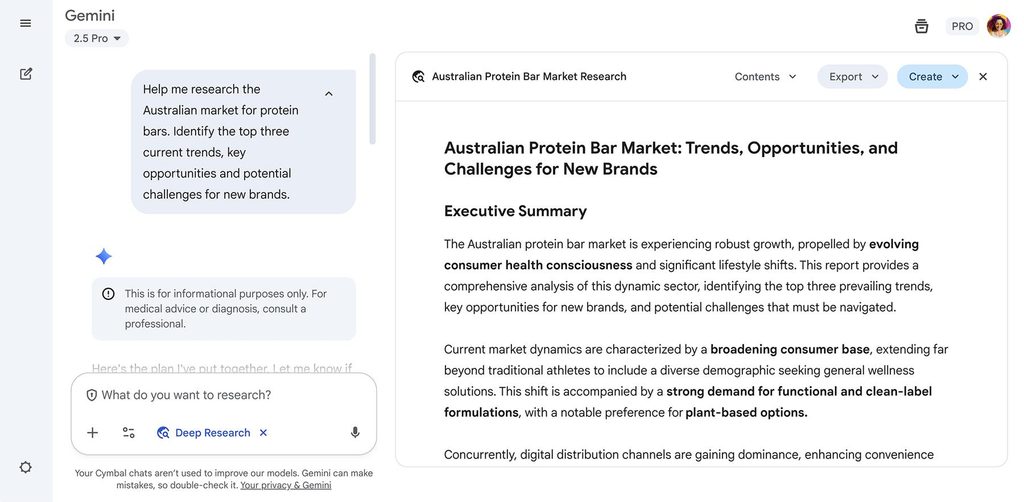
Google’s Gemini Deep Research works along similar lines. According to Google, Gemini can put together a research plan, search the web, analyze what it finds, and turn it into a multi-page report. It can also work with files you upload and pull from sources like Gmail or Drive when you give it access.
Here’s where the real difference shows up: depth.
A regular chatbot answer might look like this:
“What are the main differences between electric cars and hybrid cars?”
A deep research task looks nothing like that. It’s closer to something like:
“Compare the 2026 electric and hybrid car markets in the US and UK, including purchase prices, charging infrastructure, running costs, government incentives, and consumer trends. Use recent sources and clearly flag where the evidence disagrees.”
That’s not the same kind of task at all. It’s an entirely different level of work.
Quick Difference
Normal AI Answer vs. AI Deep Research
| Feature / Dimension | Normal AI Answer | AI Deep Research |
|---|---|---|
| 🎯 Scope & Task | Usually answers one question | Investigates a broader research task |
| 📚 Data & Context | May use limited context | Can work across many sources |
| ⚡ Speed & Response | Fast response | Takes longer |
| 📄 Output Format | Often short | Can produce a detailed report |
| 🔍 Synthesis Level | Limited comparison | Can compare multiple sources |
| 🔗 Evidence & Proof | May not show extensive evidence | Usually provides citations or source links |
This is why AI Deep Research 2026 is more important than simply calling it “better search.”
It represents a shift from AI answering questions toward AI performing research workflows.
How AI Deep Research Works
The exact tech stack differs from one company to the next, but the general workflow behind it is actually pretty easy to follow once you break it down.
Say you ask an AI:
“Research the future of AI search in 2026 and explain how Google, OpenAI, and other companies are changing online search.”
Rather than jumping straight into an answer, a research system typically works through several stages first.
Step 1: Understand the Question
Before anything else, the AI needs to actually understand what you’re asking for. A broad question like that one usually has several smaller questions hiding inside it.
So the main question might be: How is AI changing search?
But underneath that, there are a handful of things worth digging into on their own — what’s actually changed in Google Search, what “AI search” even means at this point, how AI assistants are pulling in web information, what the real advantages are, where the limitations show up, what the companies themselves are officially saying, and how all of this is affecting websites and publishers.
This planning stage matters more than it might seem, because good research really comes down to asking the right questions in the first place — not just the first one.
Step 2: Search for Sources
Once it knows what it’s looking for, the system goes out and searches the web for relevant information. This is really where deep research starts to pull away from a normal chatbot reply.
It might dig through official documentation, company announcements, research papers, news coverage, reports, and other pages that are actually relevant to the question. OpenAI’s own documentation for Deep Research says users can choose which sources it pulls from, and can even restrict it to specific websites — with the system adjusting its approach as it works through the research.
Step 3: Follow New Leads
This is probably the most interesting part of the whole process.
Say the AI comes across an article mentioning some new AI search feature. Instead of just noting it and moving on, a research agent can actually chase that lead further — looking for the original announcement, official documentation, the technical details behind it, independent coverage from other outlets, competing products, known limitations, and whatever’s actually changing for users.
In other words, one source can open the door to a whole new research question. Anthropic describes Claude’s Research capability in similar terms — Claude can run multiple searches that build on each other, figuring out what to look into next based on what it just found.
Step 4: Compare Information
Finding information isn’t really the hard part. The harder part is figuring out whether different sources actually agree with each other.
Say three different sources report three different numbers for the same thing. A good research system shouldn’t just grab the first number it comes across and call it done. It needs to weigh things like when each source was published, how credible it is, what evidence it’s actually built on, what methodology was used, the surrounding context, and — maybe most importantly — whether those sources are even measuring the same thing to begin with.
This is really where AI research starts to pull ahead of a simple search — it’s not just finding information, it’s actually weighing it.
Step 5: Synthesize the Findings
Finally, the AI has to turn everything it’s gathered into something a human can actually use.
Instead of dumping thirty links on you and leaving you to sort through them, it can organize what it found into key findings, side-by-side comparisons, plain explanations, tables where useful, a clear conclusion, and citations pointing back to where it all came from.
That whole process is called synthesis — and honestly, it’s arguably the most valuable part of the entire thing. Anyone can find information. Turning it into something clear and usable is the part that actually saves you time.
The AI Deep Research Workflow
Here is the simplest way to visualize the process:
The 5 Stages of AI Deep Research
| Stage | What AI Does | What You Get |
|---|---|---|
| 1. Understand | Breaks down your question | 📋 Research plan |
| 2. Search | Finds relevant sources | 🌐 Web evidence |
| 3. Investigate | Follows useful leads | 🔍 Detailed info |
| 4. Compare | Checks different sources | 🛡️ Stronger evidence |
| 5. Synthesize | Connects the findings | 📊 Structured report |
The key point is that AI Deep Research 2026 isn’t just about searching more websites.
It is about creating a workflow that connects search → analysis → comparison → synthesis.
That is why it can be particularly useful for complicated questions.
AI Search vs Deep Research
This is where many people get confused.
AI Search and Deep Research are not exactly the same thing.
AI search is designed to help you get information quickly.
Deep research is designed to investigate a question more thoroughly.
Think of it this way:
AI Search = “Find the answer.”
Deep Research = “Investigate the question.”
AI Search vs AI Deep Research
AI Search vs. Deep Research: Key Differences
| Feature | AI Search | Deep Research |
|---|---|---|
| ⚡ Speed | Very fast | Usually slower |
| 🎯 Purpose | Quick information | Detailed investigation |
| 🔍 Searches | Usually focused | Multiple searches |
| 🌐 Sources | Relevant sources | Broader source investigation |
| 📊 Comparison | Basic | More extensive |
| 📄 Output | Short answer | Structured report |
| 💡 Best for | Simple questions | Complex questions |
For example, if you ask:
“When was ChatGPT launched?”
You don’t need deep research.
A quick search is enough.
But if you ask:
“How has ChatGPT changed the AI industry from 2022 to 2026, and how does its development compare with Gemini and Claude?”
Now you’re asking a much bigger question.
You need historical information, product changes, official announcements, competing platforms and potentially multiple perspectives.
That’s where AI Deep Research 2026 becomes much more useful.
Google’s current Gemini documentation describes Deep Research as an in-depth, real-time research feature that can use Google Search as a source and, depending on the setup, other sources and uploaded material.
Perplexity also positions Deep Research as a more intensive research mode. Its Advanced Deep Research update says the system searches more sources, cross-references information and is designed for tasks such as fact-finding, product comparisons, academic research and professional due diligence.
🎥 Watch: Deep Research in Action
OpenAI — Updates to Deep Research in ChatGPT
This official OpenAI video demonstrates how Deep Research can search specific sites, connect apps, track progress and allow users to refine a research task while it is running.
Google — Gemini Deep Research Demo
Google’s official demonstration shows how Gemini Deep Research can be used to investigate a topic and produce a detailed research result.
Why AI Deep Research Matters in 2026
The biggest reason this actually matters comes down to one simple shift: information is getting cheaper, but making sense of it is getting harder.
Every single day, thousands of new articles, studies, product announcements, videos, and social posts pile onto the internet. Finding information isn’t really the bottleneck anymore. Figuring out which pieces of it actually matter — that’s the real problem now. And that’s exactly where AI research assistants start to earn their keep.
For Students
A student can hand AI a complicated subject and ask it to research the topic, lay out different explanations side by side, and point back to the original sources for further reading. The student still has to actually sit with the material and understand it — that part doesn’t go away. But the initial legwork, the part that used to eat up an entire evening, can happen a lot faster.
For Writers and Bloggers
Writers can lean on deep research to surface recent developments, competing viewpoints, official statistics, original announcements, expert commentary, and the sources needed to back it all up.
For a publication like AI Tech Pulse, this ends up being especially useful when covering something as fast-moving as AI products. Instead of manually searching through every major AI company’s latest research capabilities one by one, you could set up a single structured research task and have the AI compare official announcements and documentation across all of them at once.
For Businesses
Companies can put AI research to work on competitor analysis, market research, product comparisons, and keeping an eye on emerging trends. A research agent can potentially take what would’ve been hours of manual browsing and turn it into a much more organized starting point — something a team can actually build on instead of starting from scratch.
For Everyday Users
You don’t need to be any kind of professional researcher to get value out of this. Picture asking something like:
“Research the best laptops under $1,000 available in my market. Compare battery life, performance, display quality, warranty, and long-term reviews. Prioritize official specifications and reliable independent reviews.”
That’s a completely different result than just asking “What’s the best laptop?” and hoping for the best.
The real difference isn’t the AI. It’s the research brief you hand it.
A Simple Rule for Using AI Research
Matching Your Questions to the Best AI Approach
| Your Question / Use Case | Best Approach |
|---|---|
| 💬 “What is GPT?” | Normal AI / Search |
| 📰 “What’s the latest AI news?” | AI Search |
| 📊 “Compare ChatGPT, Gemini and Claude.” | AI Search or Research |
| 📈 “Analyze the AI industry from 2024–2026.” | Deep Research |
| 📁 “Build a source-backed competitor report.” | Deep Research |
| 💼 “Investigate a complicated business decision.” | Deep Research |
The deeper the question, the more useful a research workflow becomes.
But there is an important warning: a detailed AI report is not automatically a correct report.
AI can misunderstand sources, overlook important evidence, use outdated information or make an incorrect connection between two facts.
That’s why citations matter—and why you should still verify important claims yourself.
ChatGPT Deep Research
OpenAI made Deep Research one of the most important additions to ChatGPT because it changed the way users could approach complicated questions.
Instead of expecting an immediate response, you can give ChatGPT a research objective and allow it to investigate the topic.
According to OpenAI’s current documentation, Deep Research can use the public web, uploaded files and connected apps. It can also propose a research plan that users can review and modify before the research begins. During the task, users can follow its progress and later receive a structured report containing citations or source links.
That makes ChatGPT particularly interesting for people who don’t simply want an answer—they want a documented research result.
How ChatGPT Deep Research Works
A typical workflow looks something like this:
You → Research question → Research plan → Web investigation → Analysis → Report
For example, instead of asking:
“What are the best AI writing tools?”
you could give it a much more useful assignment:
“Research the best AI writing tools available in 2026 for technology bloggers. Compare writing quality, research capabilities, SEO features, pricing, citation support and limitations. Prioritize official documentation and recent independent reviews.”
That gives the AI a clear objective.
It also tells it what factors matter.
What Makes ChatGPT Useful for Research?
One of the strongest features is control.
OpenAI’s February 2026 update added the ability to focus research on specific websites and use connected apps as trusted sources. Users can also track progress and interrupt research to adjust the direction.
That can be extremely useful when you’re researching a technical subject.
For example, if you’re researching an AI product, you may want the AI to prioritize:
- the company’s official website
- official documentation
- technical papers
- government sources
- research organizations
rather than relying heavily on random blogs.
Best Use Cases for ChatGPT Deep Research
How ChatGPT Deep Research Powers Different Tasks
| Task / Use Case | Why ChatGPT Deep Research Helps |
|---|---|
| 🔬 Technology research | Can investigate multiple technical sources |
| 📊 Competitor analysis | Can compare products and companies |
| 🎓 Academic research | Useful for gathering documented sources |
| 📈 Market research | Can organize information from many sources |
| 📄 Long reports | Produces structured research output |
| 📁 File-based research | Can incorporate uploaded documents |
Another useful advantage is that completed research can be downloaded in formats including Markdown, Word and PDF, according to OpenAI’s current help documentation.
One Important Warning
Deep Research isn’t automatically correct just because the final report looks professional.
OpenAI itself notes that Deep Research can still hallucinate facts or make incorrect inferences. It can also struggle to distinguish authoritative information from rumors and may not always communicate uncertainty perfectly.

🎥 Watch: OpenAI Deep Research
Official OpenAI — Introducing Deep Research
This is useful if you want to see the research workflow rather than just reading about it.
For the latest capabilities, OpenAI’s official Deep Research documentation is also worth bookmarking.
Gemini Deep Research
Google took a slightly different route with Gemini.
Google integrates Deep Research directly into the Gemini ecosystem, giving it an interesting advantage for people who already use Google’s services.
Google’s current Gemini documentation says Deep Research can conduct in-depth, real-time research and uses Google Search as a source by default. Depending on the user’s setup, it can also use sources such as Gmail and Drive, as well as uploaded files and NotebookLM notebooks.
That makes Gemini especially interesting when your research isn’t limited to the public web.
Imagine you’re preparing a business report.
You could potentially combine:
Web information + your own documents + relevant files
instead of researching each one separately.
How Gemini Deep Research Works
Gemini starts by creating a research plan.
You can then review the plan before allowing the research to begin.
This is important because a research task can easily become too broad.
For example, suppose you ask:
“Research the future of AI search.”
Gemini might break that into several areas:
- Current AI search products
- Google Search developments
- AI-generated answers
- Search behavior
- Competition
- Publisher impact
- Future trends
You can modify the plan before starting.
That makes the process feel more like working with a research assistant rather than simply asking a chatbot a question.
Google says Gemini Deep Research generally takes around 5–10 minutes to generate a report because it analyzes many sources.
That’s considerably slower than a normal chatbot response—but that’s also the point.
You’re trading a little time for a deeper investigation.
Where Gemini Has an Interesting Advantage
The Google ecosystem.
If you already use Gmail, Google Drive or NotebookLM, Gemini’s ability to incorporate those sources can make certain research workflows much easier. Google says users can choose additional sources and, where available, limit the research to selected sources instead of Google Search.
For someone working with a large collection of documents, that can be valuable.
Gemini Deep Research at a Glance
Gemini Deep Research: Core Features & Capabilities
| Feature | Gemini Deep Research Capability |
|---|---|
| 🌐 Web research | Yes |
| 🔍 Google Search | Included by default |
| 📋 Research planning | Yes |
| 📁 Uploaded files | Yes |
| 📧 Gmail/Drive sources | Available with supported connections |
| 📝 NotebookLM sources | Supported |
| 📄 Detailed reports | Yes |
| 📊 Visual reports | Available for certain plans |
Google also says Google AI Ultra users may receive reports containing visuals such as charts, diagrams, schematics and interactive simulators.
That shows where AI research is heading.
The final result doesn’t necessarily have to be a wall of text.
Claude Research
Then there’s Claude.
Anthropic has increasingly positioned Claude as a serious tool for professional knowledge work, and its Research capability takes that idea further.
Claude’s Research mode is designed to perform multiple searches that build on one another instead of treating every search as an isolated question.
That distinction matters.
Imagine you’re researching:
“How will AI agents affect software development jobs?”
A basic search might find a few articles about AI coding.
A deeper research process could discover:
- AI coding tools
- developer productivity studies
- company announcements
- employment data
- developer surveys
- academic research
- opposing viewpoints
Then the system can use those findings to determine what it should investigate next.
That’s closer to how a human researcher works.
Claude Research’s Biggest Strength
The strength here isn’t simply the number of searches.
It’s the iterative process.
The AI can search, read, identify something important, and then search again based on what it discovered.
That means the research path can change as new evidence appears.
This is exactly the type of behavior that makes AI Deep Research 2026 more interesting than traditional search.
Claude Research vs Traditional Search
Traditional Search vs. Claude Research Mode
| Workflow Feature | Traditional Search | Claude Research |
|---|---|---|
| 🔄 Core Process | Search → results | Search → read → investigate |
| 🤖 Agency & Control | Mostly user-driven | More autonomous agent |
| 🌐 Source Handling | User opens pages manually | AI analyzes sources automatically |
| 🔍 Search Strategy | Separate, isolated searches | Connected research steps |
| 📊 Information Synthesis | User synthesizes findings | AI synthesizes complex data |
Claude is therefore particularly interesting for users who want to work through complex knowledge problems rather than simply find a webpage.

Perplexity Deep Research
Perplexity has always been closely associated with AI-powered web search, so its move deeper into research feels like a natural evolution.
Perplexity describes its Research mode as an advanced research feature that can perform dozens of searches, read hundreds of sources and reason through the material before producing a comprehensive report.
Its newer Advanced Deep Research update, announced in July 2026, focuses on more comprehensive research, additional source coverage, cross-referencing and the ability to work with uploaded documents and data analysis.
That makes Perplexity especially interesting for people who already like the search-first approach.
Why Perplexity Feels Different
The philosophy is simple:
Search is at the center.
Perplexity is built around finding information and showing where that information came from.
For quick research, that’s already useful.
But Deep Research takes the same basic philosophy and gives the system more time to investigate.
Instead of:
Question → answer
you get something closer to:
Question → searches → sources → analysis → synthesis → report
That’s a major difference.
Where Perplexity Can Shine
Perplexity’s Research mode is designed for areas such as:
- technology research
- finance
- marketing
- product research
- current affairs
- academic research
- travel planning
Its current documentation says Research can also use search and coding capabilities iteratively, refine its research approach as it learns more and export the resulting report.
And in 2026, Perplexity has pushed research beyond reports. Its Computer integration allows Deep Research findings to become other useful outputs such as spreadsheets, dashboards, presentations and websites.
That’s an important development.
Research is becoming less about reading a report and more about turning research into something you can use.
ChatGPT vs Gemini vs Claude vs Perplexity
At this point, it would be easy to declare one tool the winner.
But that’s not really how AI research works.
Different tools can be better suited to different workflows.
Here’s a practical comparison.
The Ultimate AI Deep Research Tools Breakdown
| Tool | Main Strength | Best For |
|---|---|---|
| 🟢 ChatGPT Deep Research | Control + structured reports | Complex research & professional work |
| 🔵 Gemini Deep Research | Google ecosystem | Web + Google-connected information |
| 🟠 Claude Research | Iterative investigation | Complex knowledge work |
| 🌐 Perplexity Deep Research | Search + source discovery | Web research & source-heavy tasks |
Another way to look at it is through the type of researcher you are.
Finding Your Perfect Deep Research Match
| User Type | Potentially Best Fit |
|---|---|
| ✍️ Blogger / writer | ChatGPT or Perplexity |
| ☁️ Google Workspace user | Gemini |
| 🧠 Long-form knowledge worker | Claude |
| 🔬 Source-focused researcher | Perplexity |
| 📊 Business analyst | ChatGPT |
| 📁 Document-heavy workflow | Gemini or ChatGPT |
These aren’t absolute rankings.
The best tool depends on the actual task.
Which One Should You Use?
If structured reports and control over your sources matter most to you, ChatGPT is a strong pick. If you’re already living inside the Google ecosystem day to day, Gemini becomes especially appealing. If you want an AI that leans into a more iterative, back-and-forth style of research, Claude is worth a look. And if search, sourcing, and web discovery are your priority, Perplexity is still one of the most natural fits.
Here’s the thing worth remembering: the question isn’t “which AI is smartest?” The better question is “which AI actually fits the research job I need done?” That framing gets you a much more useful answer.
Real-World Examples of AI Deep Research
The easiest way to actually grasp the value here is to stop talking about features in the abstract and just look at real tasks.
Example 1: Buying a Laptop
Instead of asking “What’s the best laptop?”, hand the AI an actual research brief: “Research laptops under $1,000 available in 2026. Compare CPU performance, battery life, display, RAM, storage, warranty, and long-term reviews. Prioritize official specifications and independent reviews.” Now the AI has something concrete to actually dig into, instead of guessing at what you mean by “best.”
Example 2: Starting a Website
You could ask: “Research the current AI technology blogging market. Identify major competitors, popular content categories, emerging topics, monetization methods, and content gaps. Use recent sources and separate verified facts from recommendations.” That single prompt could save you hours of manual browsing. It won’t replace your own judgment — you still have to decide what to do with the findings — but it hands you a far stronger starting point than staring at a blank page.
Example 3: Researching an AI Product
Say a new AI tool just launched. Instead of reading through ten scattered articles yourself, you could ask: “Investigate this product using its official website, documentation, pricing page, and independent coverage. Explain what it does, who it’s for, major limitations, pricing changes, and how it compares with competitors.” Now you’re asking the AI to actually verify and pull things together, not just summarize whatever it happens to find first.
Example 4: Researching a Major Technology Trend
For something bigger, like AI agents, the prompt might look like: “Analyze how AI agents are changing software development in 2026. Use recent company announcements, developer surveys, research papers, and independent reporting. Identify areas where sources agree and areas where the evidence is still uncertain.” This is really where AI Deep Research 2026 starts to show what it’s actually capable of.
And the pattern across all four examples is the same: the quality of what you get back depends almost entirely on the quality of the question you put in.
The Bigger Picture
There’s a quiet but genuinely important shift happening underneath all of this. AI isn’t just getting better at answering questions. It’s getting better at figuring out which question needs to be asked next.
That’s really what sets deep research apart from everything that came before it.
A human researcher doesn’t search one phrase, read the first result, and call it done. They dig. They stumble onto something they weren’t expecting. They ask a follow-up question. They weigh conflicting evidence against each other. They change direction when the first path doesn’t hold up. And eventually, they build a conclusion out of all of it.
Modern AI research systems are increasingly trying to mirror that exact workflow — not just fetch-and-answer, but investigate-and-build.
And that’s why the next stage of AI research may be les—s about searching faster and more about reasoning through information better.
Quick Summary
AI Deep Research: Styles & Core Advantages
| Tool | Research Style | Biggest Advantage |
|---|---|---|
| 🟢 ChatGPT Deep Research | Structured + controlled | Detailed documented reports |
| 🔵 Gemini Deep Research | Google-connected | Search + personal sources |
| 🟠 Claude Research | Iterative | Multi-step investigation |
| 🌐 Perplexity Deep Research | Search-focused | Broad web research + sources |
The winner isn’t necessarily the tool with the longest report.
The better tool is the one that gives you the evidence, context and workflow you actually need.
And there’s still one big problem.
How do you know whether an AI-generated research report is actually correct?
How to Get Better AI Research Results
The quality of your research starts with the quality of your request.
A vague prompt usually produces a broad answer.
A detailed research brief gives the AI a much clearer target.
Don’t Ask This:
“Research AI agents.”
That’s too broad.
Try This Instead:
“Research how AI agents are being used in software development in 2026. Compare the approaches of major AI companies, identify real-world use cases, examine developer concerns and productivity evidence, and prioritize official announcements, technical documentation and recent independent research. Clearly separate verified facts from predictions.”
That’s much stronger.
Why?
Because you’ve told the AI:
- what to research
- when the information should be relevant
- which areas to investigate
- what sources to prioritize
- how you want uncertainty handled
A Simple Deep Research Prompt Formula
The Perfect AI Deep Research Prompt Blueprint
| Element | What to Tell AI |
|---|---|
| 🎯 Topic | What are you researching? |
| 📅 Timeframe | Which dates matter? |
| 🔍 Scope | What should be included? |
| 🌐 Sources | Which sources should be prioritized? |
| 📊 Comparison | What should be compared? |
| 🛡️ Evidence | How should claims be supported? |
| 📄 Output | What should the final report look like? |
You can even tell the AI:
“If reliable evidence is unavailable, say so instead of guessing.”
That one sentence can make a research task considerably safer.
How to Fact-Check AI Research
This might be the single most important section in the whole article, so it’s worth slowing down for.
Never take an AI research report at face value. Even the most advanced research systems still make mistakes — sometimes small ones, sometimes ones that actually matter. The safest way to think about this is to treat AI as a research assistant, not the final word on anything.
Step 1: Open the Important Citations
If the AI hands you a claim that actually matters to your decision, go open the source yourself. Don’t stop at the headline — actually read the section that backs up the claim.
Say the AI tells you: “Company X increased its AI revenue by 40%.” Go find the original financial report or the official announcement it’s pulling from, and check that the source genuinely says what the AI claims it says. That single habit catches more errors than almost anything else you can do.
Step 2: Check the Date
AI tools can sometimes surface older information that still looks relevant but isn’t accurate anymore — and this is especially true in AI itself, where things move fast. Products change. Pricing changes. Features get pulled. New versions ship constantly. A page from 2024 can be completely out of date by 2026 without looking any different on the surface.
So for anything current, get in the habit of asking: is this actually still true right now?
Step 3: Find the Original Source
If something says “according to a new study…”, go track down the actual study — don’t just trust the article reporting on it secondhand. The same rule applies across the board: company announcements, government statistics, academic papers, product specifications, financial results, technical documentation. Whenever you can, get one step closer to the original evidence instead of relying on someone else’s summary of it.
Step 4: Compare Conflicting Claims
Every so often, two genuinely credible sources will disagree with each other. That’s not automatically a red flag — it often just means they’re measuring different things.
For example:
Reconciling Conflicting Data Sources
| Source A | Source B | Possible Reason |
|---|---|---|
| 📈 50% growth | 📉 35% growth | Different time periods |
| $999 price | $1,099 price | Different configurations |
| 👥 10 million users | 👥 8 million users | Different measurement dates |
| 🟢 “Available” | 🟡 “Coming soon” | Different regions |
A good researcher doesn’t just pick the number they happen to like better. They dig into why the numbers differ in the first place. And honestly, that’s one of the most genuinely useful things you can ask AI to do for you.
Step 5: Ask AI to Show Its Uncertainty
Try prompts like: “Identify claims where the evidence is weak.” Or: “Which conclusions are directly supported by sources, and which are your own interpretation?” Or: “Find conflicting evidence and explain why the sources disagree.”
Questions like these push the AI past simple summarizing and force it to actually show its work — which is exactly what you want from something claiming to have “researched” a topic.
Privacy and Limitations
AI research is genuinely powerful, but it’s not magic, and it helps to go in with clear eyes about where it falls short — especially before leaning on it for anything serious.
AI Can Still Be Wrong
A research system can misread a source, connect two facts that aren’t actually related, or land on a conclusion that just doesn’t hold up. And running more searches doesn’t automatically fix that — more searches just means more material to potentially misread.
Sources Can Be Low Quality
The open web is full of outdated articles, copy-pasted content, incorrect statistics, affiliate-driven pages, AI-generated filler, misleading headlines, and claims with no sourcing behind them at all. An AI can stumble onto exactly those pages just as easily as it can find something solid. That’s why source quality ends up mattering a lot more than source quantity — ten weak sources don’t add up to one strong one.
Research Can Take Time
Deep research is deliberately slower than a normal AI reply, and that’s by design — the system is running multiple searches, actually reading through what it finds, and analyzing everything before it hands you a final result. If all you need is one quick fact, deep research is overkill. Save it for the questions that actually deserve the extra time.
Some Information Isn’t Public
AI can’t magically research information that isn’t available to it.
Private databases, paywalled research, restricted company information and inaccessible websites can create gaps.

Best AI Research Tool for Different Users
So, which tool should you actually use?
There isn’t one universal winner.
Your best option depends on what you’re trying to accomplish.
For Bloggers and Content Creators
ChatGPT Deep Research or Perplexity can be strong choices.
They can help discover current information, compare sources and create a research foundation before you start writing.
For a technology blog like AI Tech Pulse, this can be particularly useful when researching fast-moving AI announcements.
For Google Workspace Users
Gemini Deep Research makes a lot of sense if your work already lives inside Google’s ecosystem.
The ability to combine web research with supported personal sources can simplify document-heavy workflows. (support.google.com)
For Complex Knowledge Work
Claude Research is worth considering when you want an AI to perform connected searches and investigate a topic progressively. Anthropic explains that Claude’s Research capability can conduct multiple searches that build on each other. (support.claude.com)
For Search-First Research
Perplexity remains a natural fit for people who want web discovery and source visibility at the center of the workflow. Its Research mode is specifically designed to perform multiple searches and synthesize information into a report.
Practical Recommendation
Quick Tool Recommendation by User Profile
| User / Profession | Good Starting Choice |
|---|---|
| 📝 Blogger / writer | ChatGPT / Perplexity |
| 🎓 Student | Gemini / ChatGPT |
| ☁️ Google Workspace user | Gemini |
| 🔬 Professional researcher | ChatGPT / Claude |
| 🔍 Source-focused researcher | Perplexity |
| 📊 Business analyst | ChatGPT |
| 📁 Document-heavy user | Gemini / ChatGPT |
Don’t treat this as a permanent ranking.
AI products change quickly.
A tool that is your favorite today could have a completely different feature set a few months from now.
The Future of AI Research
The biggest shift on the horizon might be that AI research is starting to move past the report itself.
Right now, you ask AI to look into something, and it hands you back a report. That’s roughly where things stand today. But going forward, research agents are increasingly likely to take that research and actually do something with it, rather than just handing it over and stepping back.
Picture asking an AI: “Research the 20 biggest AI companies, compare their latest products, and create a competitive landscape.” Instead of just a written report, you could get comparison tables, charts, a presentation, a spreadsheet, or a full visual dashboard — whatever format actually fits the task.
This shift is already starting to show up in the tools people use. Perplexity’s recent Advanced Deep Research updates, for instance, describe features aimed at turning research into more usable, actionable output — including data analysis and other generated artifacts, not just a wall of text. (perplexity.ai) Google’s moving in a similar direction with Gemini, adding more visual research outputs like charts and diagrams for users who have access to them. (support.google.com)
The long-term direction is pretty clear once you step back and look at it: research leads to analysis, analysis leads to creation, and creation leads to action.
AI isn’t just going to tell you what it found anymore. Increasingly, it’s going to help you actually use it.
AI Deep Research 2026 — Frequently Asked Questions
What is AI Deep Research 2026?
AI Deep Research 2026 refers to the growing class of AI-powered research systems that can search multiple sources, investigate a complex question, analyze evidence and synthesize the findings into a structured result.
Is AI Deep Research better than Google Search?
Not always.
Google Search is usually faster for simple questions and finding specific websites.
Deep research is more useful when you need to investigate a complicated topic involving multiple sources.
Can AI Deep Research replace a human researcher?
Not completely.
AI can automate searching, summarizing and organizing information, but humans still need to evaluate important evidence, understand context and make final decisions.
Which AI has the best Deep Research?
There isn’t one universal winner.
ChatGPT, Gemini, Claude and Perplexity each have different strengths, and the best option depends on your research task.
Does Deep Research use real websites?
Major research systems can search online sources, but the exact sources and capabilities depend on the tool and the user’s settings or plan.
Can AI Deep Research make mistakes?
Yes.
AI can misunderstand sources, use outdated information or make incorrect conclusions. Important claims should always be checked against the original source.
How long does AI Deep Research take?
It depends on the platform and complexity of the task.
Deep research is normally slower than a regular chatbot answer because the system performs additional searching and analysis.
Is AI Deep Research free?
Availability varies by platform, plan and region.
Features and usage limits can change, so check the official pricing and documentation pages before relying on a particular plan.
Conclusion: AI Is Becoming Your Research Assistant
The most significant thing about AI Deep Research in 2026 isn’t that it can search the internet — that part’s been around for decades. What actually sets these systems apart is everything that happens after the search starts.
Modern AI research tools can dig into a question, chase down leads as they come up, weigh multiple sources against each other, organize the evidence that actually supports a conclusion, and pull it all together into something clear and readable. For researchers, professionals, and students alike, that can mean genuinely significant time saved.
But there’s a line worth holding onto here: AI should make the research process better, not replace your own judgment. It’s a tool that speeds up the legwork — it’s not a substitute for actually thinking through what you find.
The workflow that actually works stays pretty simple: ask, research, compare, verify, decide. Skip verify, and you’ve built something on a foundation you never checked.
And each platform really does have its own strength. ChatGPT works well when you want structured research with more control over the process. Gemini has an edge if you’re already living inside Google’s ecosystem. Claude tends to shine in more iterative, exploratory digging. Perplexity remains the strongest pick when sourcing is your main priority.
But no matter which one you reach for, the same rule applies: check the evidence behind anything that actually matters before you act on it.
That’s really the core lesson of AI Deep Research in 2026. The future isn’t about AI simply knowing more than it used to. It’s about AI getting better at finding the right information, understanding it in context, and helping turn all of that into something you can actually act on.